
Building a production‑ready Document Portal with LLMOps (Part-4)
Tying everything together into one intelligent application

👋 Welcome back to the final technical deep dive in our journey!
In the last three parts, we laid the foundational LLMOps architecture, built the robust scaffolding with dynamic config, logging, and model loading, and mastered the complex Data Ingestion Pipeline to create a searchable FAISS index.
Now, it’s time to unleash the intelligence we’ve built! This is the most exciting installment, where we’ll show you how the three core features—Document Analyzer, Document Comparer, and Document Chat—work under the hood and how we tie everything together into a high-performance FastAPI application.
Ready to see the Document Portal come fully online? Let’s dive into the core engine!
About the Author:
Arun Subramanian: Arun is a Senior Data Scientist at Amazon with over 13 years of AIML experience and is skilled in crafting strategic analytics roadmap, nurturing talent, collaborating with cross-functional teams, building robust scalable solutions and communicating complex insights to diverse stakeholders.
The Intelligent Core: Unpacking Our LLM Features
All three of our intelligent features are built on the power and flexibility of LangChain Expression Language (LCEL), allowing us to compose complex LLM workflows with simple, readable pipe (|) syntax.
1. Document Analyzer: Structured Metadata Extraction
The DocumentAnalyzer is a power tool designed to transform raw, unstructured text into clean, structured data. This is crucial for automation and downstream analysis.
The Goal: Extract a structured summary and key metadata (like document title, author, keywords) from any text.
The Chain: We leverage a simple yet robust LCEL chain:
Prompt | LLM | OutputFixingParser
Structured Output: We define the desired output format using a Pydantic model. The
JsonOutputParserconverts the LLM’s response into a valid Python dictionary that matches this schema.The Safety Net: A large language model sometimes “hallucinates” or produces slightly ill-formatted JSON. To prevent failures, we wrap the parser in an
OutputFixingParser. If the initial output is invalid, this parser uses the LLM one more time to automatically correct the JSON, ensuring we get a clean, usable response every time.
2. Document Comparer: Side-by-Side Analysis
The DocumentComparerLLM handles a high-value task: comparing two long documents and summarizing the key differences into an easy-to-read, structured table.
The Goal: Accept the combined text of two documents and return a structured comparison.
The Chain: The process is similar to the analyzer, prioritizing clean output:
Prompt | LLM | JsonOutputParser
The Output: The final step is to convert the validated JSON output into a Pandas DataFrame before returning it to the user. This small utility function (
_format_responsein document_comparer.py) is key, as it delivers the information in the perfect format for immediate display or further data manipulation.
3. Document Chat: The Conversational RAG Engine
This is the brain of the operation: the ConversationalRAG class, which implements a sophisticated Retrieval-Augmented Generation (RAG) system.
Unlike simple RAG, a Conversational RAG must remember previous turns to accurately answer follow-up questions. Our solution uses a three-stage LCEL graph.
Stage 1: The Question Rewriter 🧠
The first crucial step is to use a dedicated prompt and the LLM to rewrite the user’s question by incorporating the full chat history.
Input + History | Contextualize Prompt | LLM | String Parser
For example, if the user asks, “What is the capital of France?” followed by “What is its population?”, the rewriter transforms the second question into: “What is the population of Paris?” This maintains context for the next step.
Stage 2: Document Retrieval 📚
The rewritten, contextualized question is now passed to our FAISS retriever. The retriever performs a semantic search against the vector index we built in Part 3 and pulls the most relevant document chunks (e.g., the top 5 chunks).
Rewritten Question | Retriever | Document Formatter
Stage 3: Answer Generation 💡
Finally, we construct the main chain. It accepts the original input, the full chat history, and, most importantly, the newly retrieved context, and sends it to the final LLM. The LLM now has all the necessary components to generate a factual, context-aware, and conversational answer.
Context, Input, History | QA Prompt | LLM | String Parser
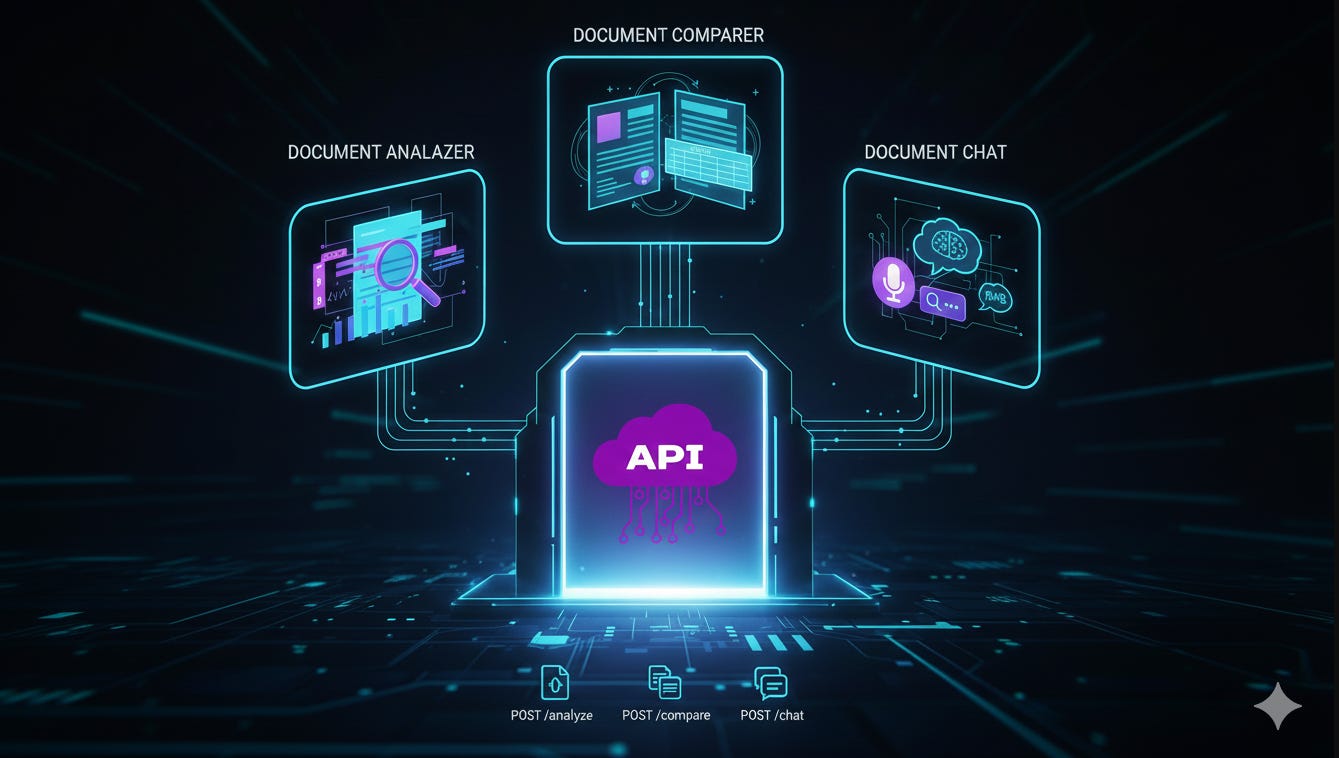
Tying It All Together: FastAPI as the API Gateway
The final piece of the puzzle is exposing all this intelligence to the world, and we use FastAPI to do it. FastAPI is a modern, high-performance Python web framework that uses standard Python type hints to automatically provide data validation, serialization, and interactive documentation (Swagger UI).
In our main.py file, the FastAPI app acts as the gateway, mapping HTTP requests to the correct LLM core service:
1. Document Analysis Endpoint
Endpoint:
POST /analyzeFunction: Accepts a document file (
UploadFile).Flow: The file is read and the text is passed to our
DocumentAnalyzerclass.
2. Document Comparison Endpoint
Endpoint:
POST /compareFunction: This is simplified in the API to call our
DocumentComparerLLM.Flow: In a production environment, this would handle two file uploads, merge their text, and then call
DocumentComparerLLM().compare_documents().
3. Conversational RAG Endpoint
Endpoint:
POST /chatFunction: Accepts the user’s
questionand asession_idto maintain conversation state.Flow: It instantiates
ConversationalRAG, loads the correct vector index based on thesession_id, and then runs the three-stage LCEL chain viarag.invoke(question, chat_history=[]).
By using FastAPI, we’ve wrapped our complex, intelligent core logic into simple, scalable API calls, ready for any front-end application to consume!
Conclusion and What’s Next 🚀
You’ve done it! We’ve successfully built the brain of the Document Portal, mastering:
Structured Analysis: Extracting data from documents using robust LCEL chains and Pydantic.
Complex Reasoning: Comparing multiple documents and formatting the results cleanly.
Conversational AI: Building a multi-stage RAG pipeline that maintains chat history and retrieves context intelligently.
Production Readiness: Integrating everything neatly into a scalable FastAPI API.
Our application is now fully functional! In the final installment of this series, we will move from a local setup to a true production environment. Get ready to conquer Dockerization and set up continuous integration/continuous deployment (CI/CD) with GitHub Actions. This is where we make sure your Document Portal can handle real-world scale.
See you in the final part!