
Building a production‑ready Document Portal with LLMOps
Learn how to build a production ready application with LLMOps

Ever felt overwhelmed by the sheer volume of documents and data you have to sift through? What if you could chat with your documents, compare different versions, and instantly analyze key information? That's exactly what my latest project, a Document Portal built with LLMOps, helps you do. We have built prototypes that exactly does this earlier but for the first time, I am going to walk you through the process of turning your prototype into a production-ready application. I'm excited to share the journey of building this application from the ground up, and I want to invite you to join me!
Over the next few weeks, we'll dive into the architecture, code, and deployment of a full-stack LLMOps project. We'll go from a blank slate to a fully functioning application, ready for production. This isn't just about showing you what I built—it's about empowering you to build similar, powerful tools yourself.
In this blog series, we will:
Set the Stage: We'll start with the foundational project setup, including folder structure, Python environments, and essential configurations.
Connect the Pieces: You'll learn how to set up LLM APIs, implement robust Pydantic data validation, and build the front-end with HTML and CSS.
Dive into the Core: We'll explore the heart of the application: data ingestion, document analysis, and the fascinating world of document comparison and chat functionalities.
Build for Production: Finally, we'll tackle Dockerization, GitHub Actions for CI/CD, and deploying the application to AWS ECS Fargate.
By the end of this series, you'll have a clear, actionable blueprint for building your own LLM-powered applications. You'll master key concepts and unlock the potential of LLMs to solve real-world problems.
Ready to get started? Let's jump right in with the initial project setup!
Note - For those bravehearts who seek to build the application following this series, you can find the complete code in this GitHub repo.
About the Author:
Arun Subramanian: Arun is a Senior Data Scientist at Amazon with over 13 years of data science & ML experience and is skilled in crafting strategic analytics roadmap, nurturing talent, collaborating with cross-functional teams, and communicating complex insights to diverse stakeholders.
High Level Architecture
At its core, this project is a containerized system designed for modern LLMOps.
Front-End: The user-facing part of the application is built with standard web technologies: HTML and CSS. This layer focuses on providing a clean, responsive interface for interacting with the document portal, handling file uploads, displaying analysis results, and managing the chat interface. It acts as the "face" of the application, seamlessly connecting you to the powerful back-end.
Back-End: This is where the LLM magic happens. The back-end is a Python-based FAST API server. It manages crucial tasks like data validation with Pydantic to ensure data integrity, handling the complex logic for document ingestion and analysis, and making calls to various LLM providers. By running as a separate service, the back-end can be scaled independently, ensuring the application remains responsive even as demand for its services grows.
The Tools and Frameworks 🛠️
To build this, we'll be using a robust and flexible tech stack that gives you a lot of options:
LLM APIs: The back-end is designed to be model-agnostic, allowing you to easily switch between different LLM providers based on your needs. The project is configured to work with powerful APIs from Groq, OpenAI, Gemini, Claude, and Hugging Face.
LangChain LCEL & Vector Databases: We'll harness the power of LangChain's LCEL (LangChain Expression Language) to create custom, production-ready chains for our application's logic. This allows us to orchestrate complex LLM workflows with ease. To give our LLM the ability to "remember" and reference specific documents, we will use the FAISS Vector Database for efficient semantic search.
Logging: A key part of any production application is robust logging. We'll implement a structured logging approach using the logging package in Python, enhanced by Structlog to ensure our logs are consistent, AWS CloudWatch compliant, and easy to analyze.
API Key Management: A critical part of production-grade LLMOps is securing your API keys. We'll discuss the best practices for this, including using environment variables and, for a more robust solution, AWS Secrets Manager, to ensure your sensitive credentials are never exposed in your code or version control.
CI/CD & Deployment: The project is built for continuous delivery. We'll use GitHub Actions to automate the workflow. This pipeline will automatically trigger on code changes, running unit tests to ensure quality, building a Docker image of the application, and pushing it to a container registry like ECR (Elastic Container Registry). The final step is to deploy this containerized application to AWS ECS Fargate, a serverless compute engine for containers. This approach simplifies deployment and management, allowing you to focus on the code, not the infrastructure.
This architecture ensures the Document Portal is not just a proof-of-concept but a scalable, secure, and production-ready application.
Environment and Project Setup
Before we can build anything amazing, we need a solid foundation. This is where a clean project structure and a well-configured environment come in. Think of it as preparing your workshop before you start building.
Setting up your project folder
A logical folder structure is crucial for keeping your project organized and easy to navigate, especially as it grows. Here's what we'll be using:
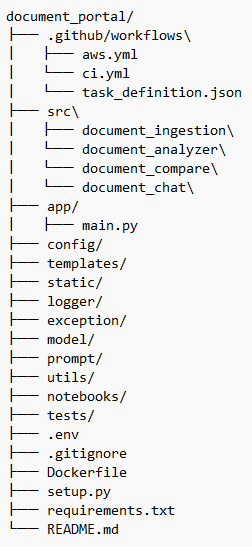
.github/workflows/: This is where your Continuous Integration and Continuous Deployment (CI/CD) magic happens. The.ymlfiles (aws.yml,ci.yml) contain the instructions for GitHub Actions to automatically run tests, build your Docker image, and deploy your application to AWS. Thetask_definition.jsonfile is a crucial AWS component that describes how your containerized application should run on ECS Fargate.src/: This directory is the core of your application's logic. Instead of a singleapp/folder, we're separating our project's key functionalities into distinct, self-contained modules.document_ingestion/: Handles all the logic for processing and ingesting new documents into the system.document_analyzer/: Contains the code for analyzing and extracting insights from the documents.document_compare/: The brain behind comparing different documents and highlighting key differences.document_chat/: The code that powers the interactive, conversational component of the portal.
app/: This folder will house the main entry point for your application.main.py: The single file that will bring together all the components from thesrc/directory and expose them as a web application.
config/: This directory holds all your application's configuration settings, keeping them separate from the code. This is where you'll define settings for different environments (development, production) and API endpoints.templates/andstatic/: These folders are for your front-end components.templates/will contain your HTML files that structure the web pages, andstatic/will hold your CSS, JavaScript, and images, which bring your application to life and give it a polished look.logger/andexception/: For a robust application, you need to manage logs and errors effectively.logger/: Contains the setup for our structured logging with Structlog, ensuring every event is recorded in a clear and consistent format.exception/: A centralized place to define custom exception classes and handle errors gracefully throughout the application.
model/: This is for your data models, such as Pydantic models for data validation, ensuring that data flowing through your application is always clean and reliable.prompt/: A best practice in LLMOps is to manage your prompts externally. This folder will store all the custom prompts, making them easy to version, test, and update without touching the core logic.utils/: This is a great place for small, reusable utility functions that are used across different parts of the project, avoiding code duplication.notebooks/: A space for exploratory analysis, quick tests, and demonstrations. This is perfect for experimenting with new models or data, and it keeps your core codebase clean.tests/: A dedicated folder for all your unit and integration tests, ensuring every part of your application works as intended before you deploy.setup.py: The file that makes your project a package, defining its metadata and dependencies. This is a common practice for more complex Python projects..env,.gitignore,Dockerfile,requirements.txt,README.md: These files serve the same crucial roles we discussed before: managing environment variables, ignoring files for Git, defining the container, listing dependencies, and providing a project overview.
With this structure, you're not just building a project; you're building a maintainable, scalable, and professional-grade application. In the next part, we'll start filling these folders with the actual code!
Setting up your project environment
Think of a virtual environment as a clean sandbox for your project. It prevents dependencies from one project from clashing with another, ensuring your code works exactly as you expect it to, regardless of other packages you have installed globally on your machine.
To get started, open your terminal and run the following commands. Conda environment keeps everything self-contained and makes it easy to manage. Once the environment is active, you can install all the Python dependencies within this specific environment.
conda create -p venv python=3.10 -y
conda activate ./venv
pip install -r requirements.txt
Conclusion
You've made it through the foundational setup! We've covered the high-level architecture, a detailed breakdown of the project's folder structure, and the essential steps for setting up your environment. By now, you should have a solid understanding of the "why" and "what" behind our project's design.
This isn't just a simple demo; it's a blueprint for building a scalable, maintainable, and production-ready LLMOps application. We’ve established the core components, from the flexible LLM API integrations to the robust CI/CD pipeline, setting the stage for some serious coding.
In the next blog post, we'll get our hands dirty with the code itself. We'll start by building the crucial logging, exception, utils and config modules and setting up our LLM APIs. You'll learn how to implement secure API key management and create powerful, reusable data models using Pydantic. This will be our first step in building the intelligent core of the Document Portal.
Get ready to code! We're moving from theory to practice, and I can't wait to show you how all these pieces come together.